Beads you actually move
Tap a bead or drag a whole column — the earth beads below the bar shove each other along the rod the way they do on a real soroban. Nothing is a button pretending to be a bead.
Personal project · Flutter · iOS & Android
A soroban — the Japanese abacus — rebuilt as an app you work with your fingers. Carved wood, brass rods, gemstone beads, and arithmetic that behaves like the real instrument rather than like a calculator wearing its costume.
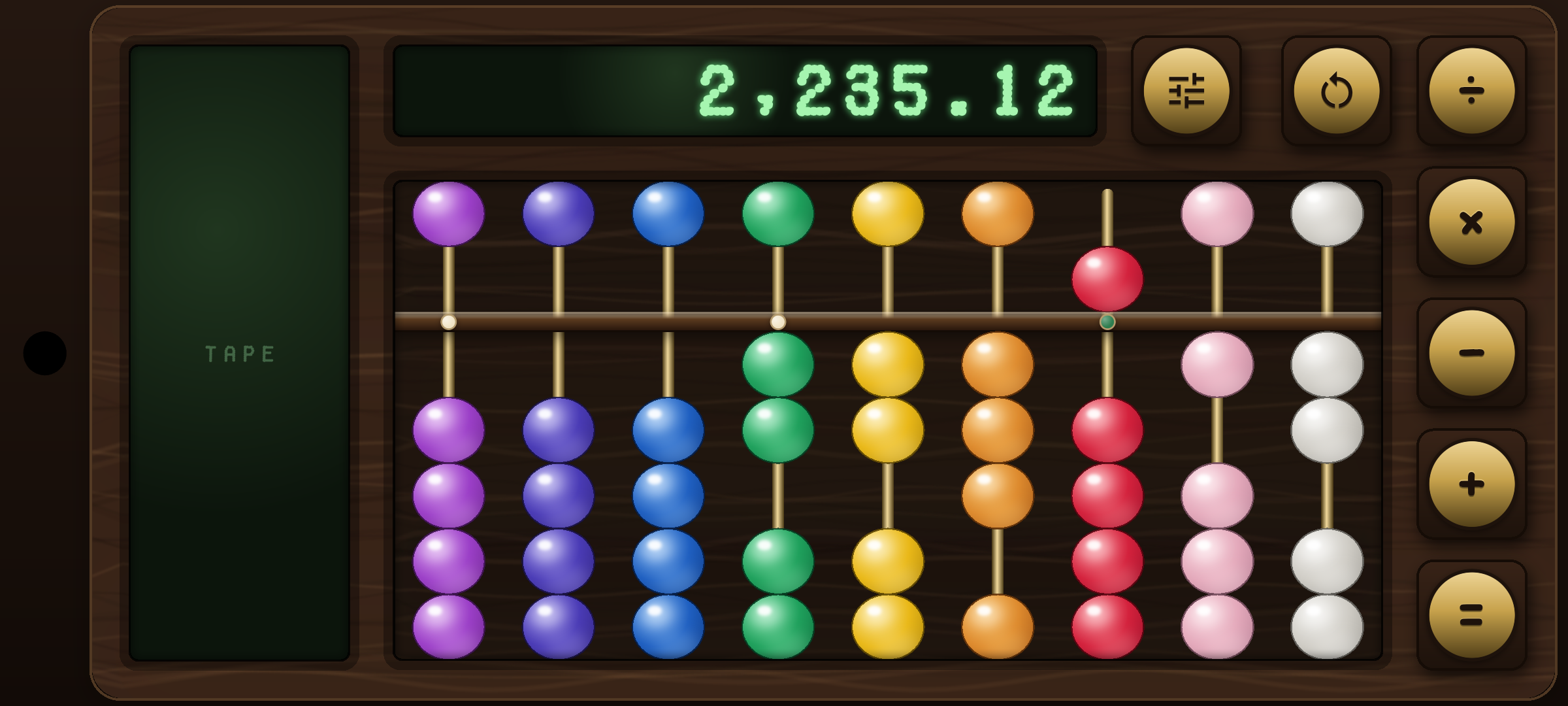
Nine rods, two of them fractional, reading 2,235.12 — tape down the left edge, operator column on the right.
Most abacus apps are calculators with beads drawn on. You tap, a number appears in a box, and the beads reset themselves. That misses the whole point of the instrument: on a soroban the beads are the number, and the skill is in keeping a running total on the board while you work.
So this one never clears itself. Beads move only when you move them. The readout simply reports what the board already says, and the operator keys do nothing but mark the tape — press +, keep adding beads, press =, and the tape records the difference since the checkpoint. It is a soroban first and a calculator second.
The rest was an excuse to build a physical object in software: a walnut chassis with procedural grain, a recess carved into it for the bead well, brass rods, and beads cut as polished stones whose colour tells you the place value at a glance.
Tap a bead or drag a whole column — the earth beads below the bar shove each other along the rod the way they do on a real soroban. Nothing is a button pretending to be a bead.
Operator keys never clear the board. Pressing one drops a checkpoint; the next operator, or “=”, logs how the value moved since then onto the tape running down the side of the board. You add by moving beads, not by typing.
A settings drawer sets anything from 3 to 12 rods and up to 4 decimal places. The whole board is rebuilt and re-proportioned around the new layout, tape and all.
Whole places wear gemstones in rainbow order from the units rod up — ruby, amber, citrine, emerald, sapphire. Fractional rods wear paler crystals, so the decimal point is something you see rather than count.
Every bead that lands plays a collision sound out of a pooled audio player, so a fast run of beads clicks like the real thing instead of stuttering.
Locked to landscape and immersive fullscreen. The frame takes the whole screen so the beads stay big enough to hit with a thumb.
Deck heights, the reckoning bar, rod length and bead width are all multiples of a single bead height, published down the widget tree through an inherited widget. Width is the deliberate exception — the well takes whatever it is offered and the rods spread evenly across it. New parts read their size from the tree instead of introducing another constant.
Each bead column owns its own local position state and pushes committed moves down into the model, which holds the counted value and sums the rods. Nothing ever reads positions back out. Clearing bumps a version number that re-keys the tree, rebuilding every column with fresh state — one reset path, no reconciliation bugs.
The readout and the clear knob are mounted elsewhere in the tree and cannot reach the bead model, so they talk to it through a small listenable controller. The bead well stays exactly one thing: beads. No readout, no buttons, no tape.
The grain is procedural and seeded — a different seed is a different board. The recess is painted in blacks so the grain shows through, which is what makes the bead well and both screens read as cut into one piece of wood. No image assets in the chassis at all.
I build mobile and web products end to end — from the interaction detail up to the serverless plumbing behind it.
Privacy policy — the app collects nothing.